By Dairon Canel · Founder, Proven · Updated September 2026
Guide
How to run a fake door test when you have zero users
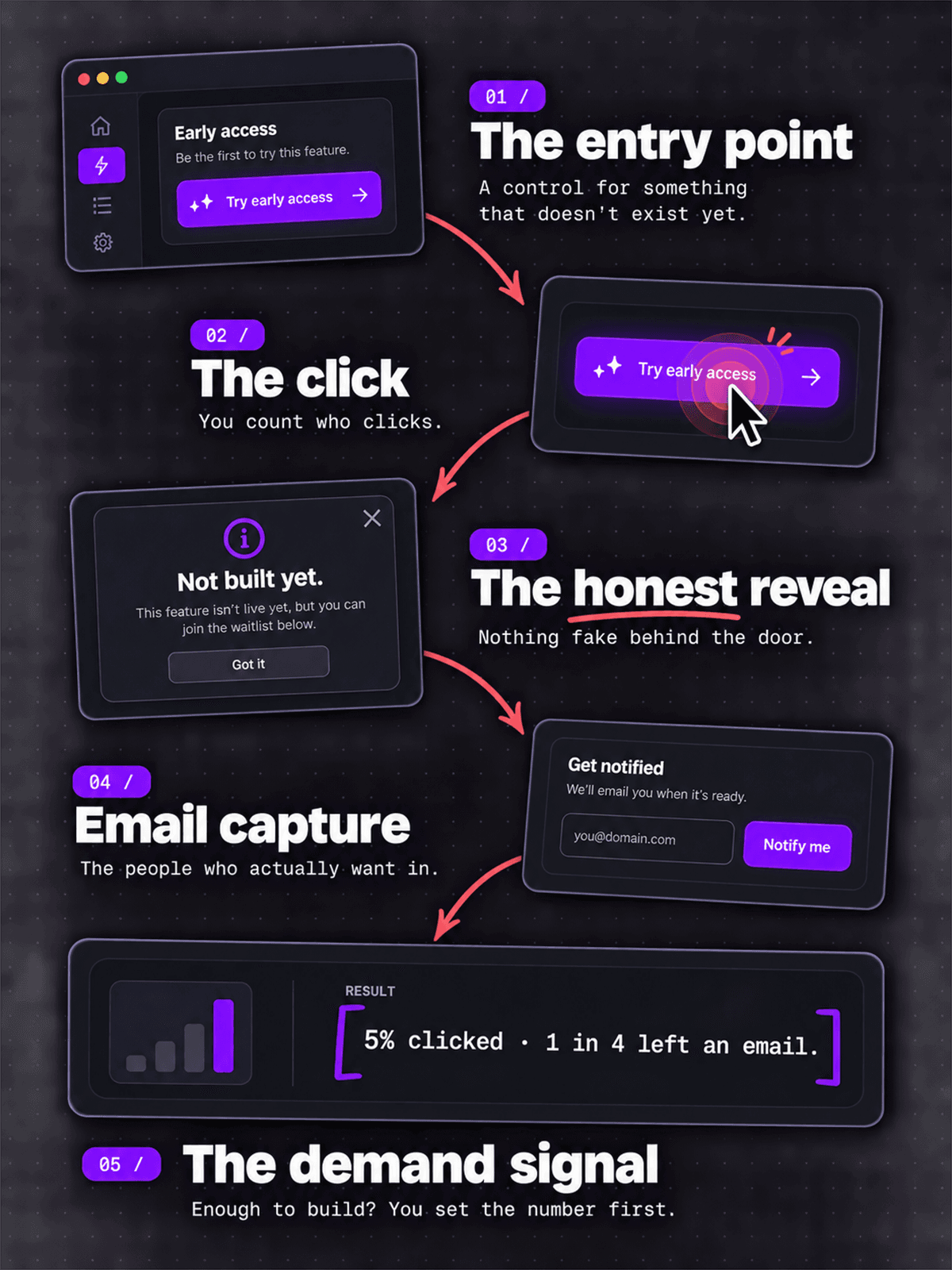
A fake door test measures demand for a product or feature you haven't built yet. You put a realistic entry point in front of people (a button, a pricing tier, a landing page), count how many click, and show them an honest “not built yet” message instead of the real thing.
The tactic has been around for years, but it's worth a fresh look in 2026. When you can describe a feature to Claude Code or Lovable and have a rough version running by the weekend, the math changes. Sometimes building the real thing is faster than setting up a convincing fake. This guide covers when a fake door still earns its place, how to run one when you have no audience to test on, and the one thing a click will never tell you. If you're working through startup idea validation more broadly, treat the fake door as one input, not the verdict.
What a fake door test actually is
The mechanic is simple. You show people an entry point to something, they click it expecting it to work, and instead they hit a short honest message: this isn't built yet, want us to tell you when it is? You count the clicks, and you capture emails from the people who wanted in.
The entry point can be a lot of things. A new item in a navigation menu. A pricing tier that isn't real yet. A “Download as PDF” button. A landing page for a product you haven't started. An ad pointing to a signup form. What matters is that it sits where a real feature would sit, so a click means what a real click would mean.
You'll also see this called a painted door test. Same idea: the door looks real, but there's nothing behind it. Some teams use “painted door” for tests inside an existing product and “fake door” for standalone landing pages, but the terms are interchangeable.
Fake door vs painted door vs smoke test vs concierge MVP
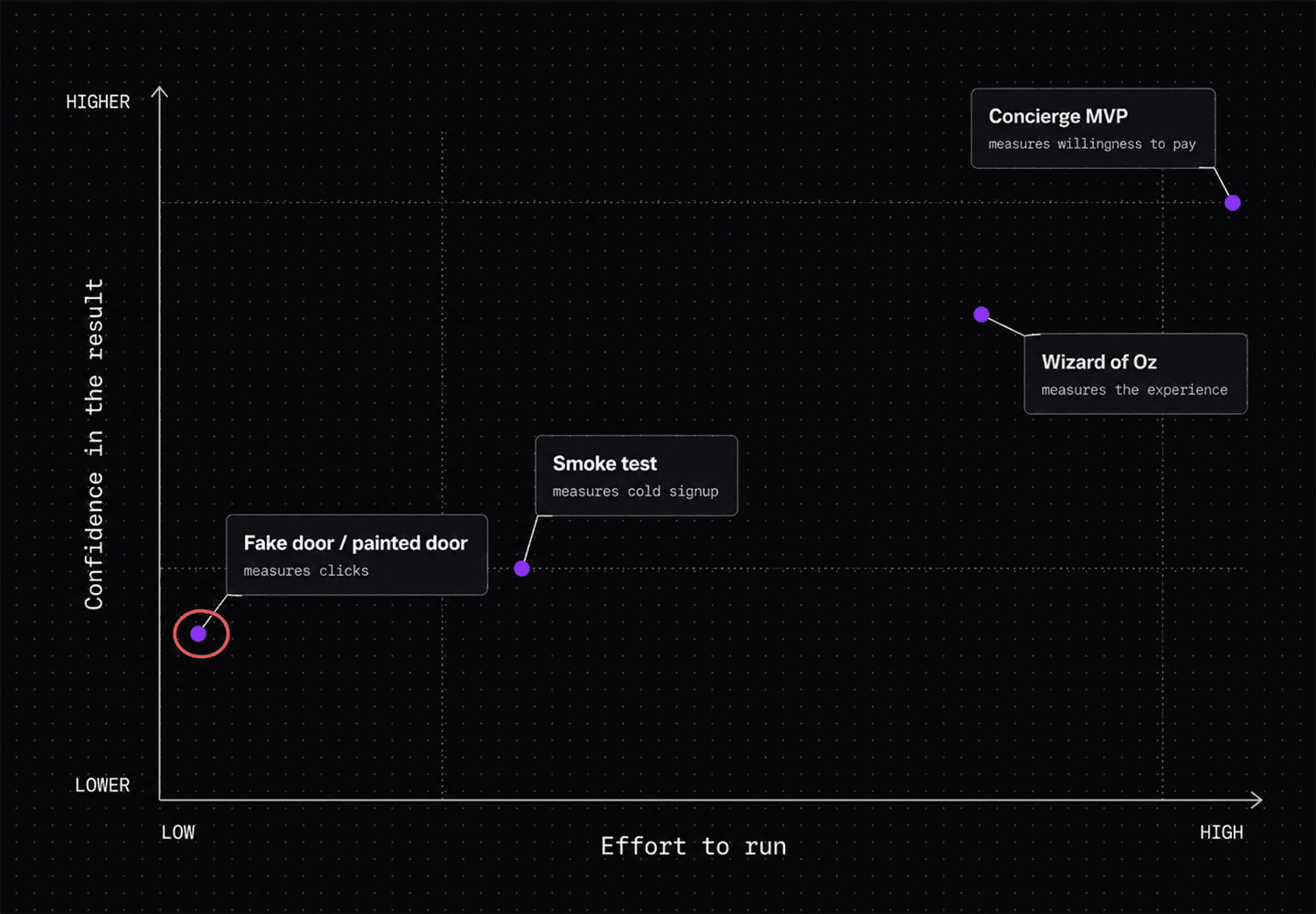
Fake door testing is one of a family of techniques for testing demand before building. They get mixed up a lot, so here is how they differ.
| Method | What you put in front of people | What it tells you | Best when |
|---|---|---|---|
| Fake door / painted door | A button or entry point for a feature that doesn't exist | Whether people want it enough to click | You have some traffic and a specific feature question |
| Smoke test | A landing page, often with paid ads, for a product that doesn't exist | Whether the positioning pulls clicks and signups from cold traffic | You have no audience and need to buy your way to a sample |
| Concierge MVP | A real outcome, delivered manually behind the scenes | Whether people will pay, and what the work actually involves | The value is a service you can do by hand for a few customers |
| Wizard of Oz | A product that looks automated but has a human doing the work | Whether the experience is worth paying for before you automate it | Automation is the expensive part and you want to test the rest first |
Pretotyping is the umbrella term Alberto Savoia coined for all of this: testing “the right it” before you commit to building it right. A fake door is one of the cheapest pretotypes you can run. If you want to see what these look like once real people are using them, here are five famous minimum viable product examples and a small one that's live today.
When it's worth it, and when to just build the thing
There's a 2026 wrinkle. If the feature you're testing would take you a weekend to build with an AI coding tool, a fake door might not be worth the setup. You spend two days making a convincing fake and reading clicks, when you could have spent two days shipping a real version behind a feature flag and watched what people actually did. Real usage beats stated intent every time.
A fake door still earns its place when:
- The real build is genuinely expensive. Weeks of work, a new integration, a data pipeline, anything you can't fake your way past in a weekend.
- You're testing a pricing or packaging question, not a feature. “Would people pay $50 a month for this tier” is a question a fake door answers well and a prototype doesn't.
- You're choosing between directions. Three possible features, limited time, and you want the market to break the tie.
- You'd be embarrassed to ship the quick version. Some products live or die on first impressions, and a rough real feature can do more damage than a clean “coming soon.”
If none of those apply, build the smallest real version instead. You'll learn more.
How to run one with zero users
Most guides on fake door testing assume you already have a product with traffic, an analytics stack, and user segments. If you're a solo builder with an idea and no audience, here is the version that works for you.
1. Write the hypothesis and the number
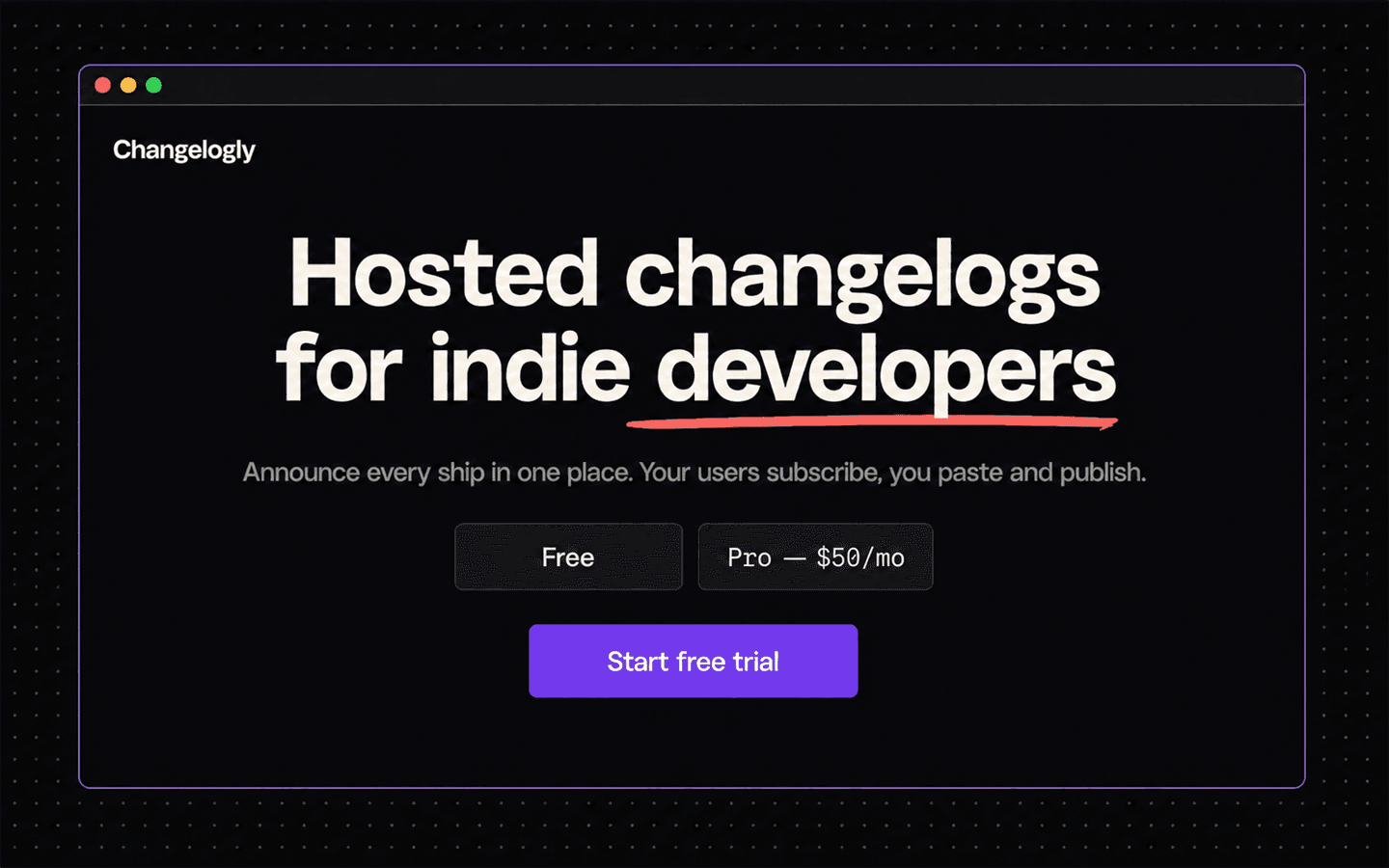
Before you build anything, write down what you believe and what result would change your mind. “I think indie developers will pay for automated changelog hosting. If at least 5% of visitors click ‘Start free trial’ and a quarter of those leave an email, I'll build it.” Pick the numbers now, while you're honest. Picking them after you see the data is how every fake door test lies to its owner.
2. Build the door
A one-page site is enough. Framer, Carrd, or a single page you code yourself, whatever you can put up in an afternoon. It needs a headline stating the value, two or three sentences of detail, and one real call to action: “Start free trial,” “Get early access,” “See pricing.” If you're testing price, put a real pricing block on the page with the tiers you're considering.
3. Track the clicks
You need to know how many people saw the page and how many clicked the CTA. Plausible, Fathom, or a simple custom event all work. Set up one event on the button. This takes about 20 minutes. Don't skip it and try to reconstruct the numbers later.
4. Build the honest reveal
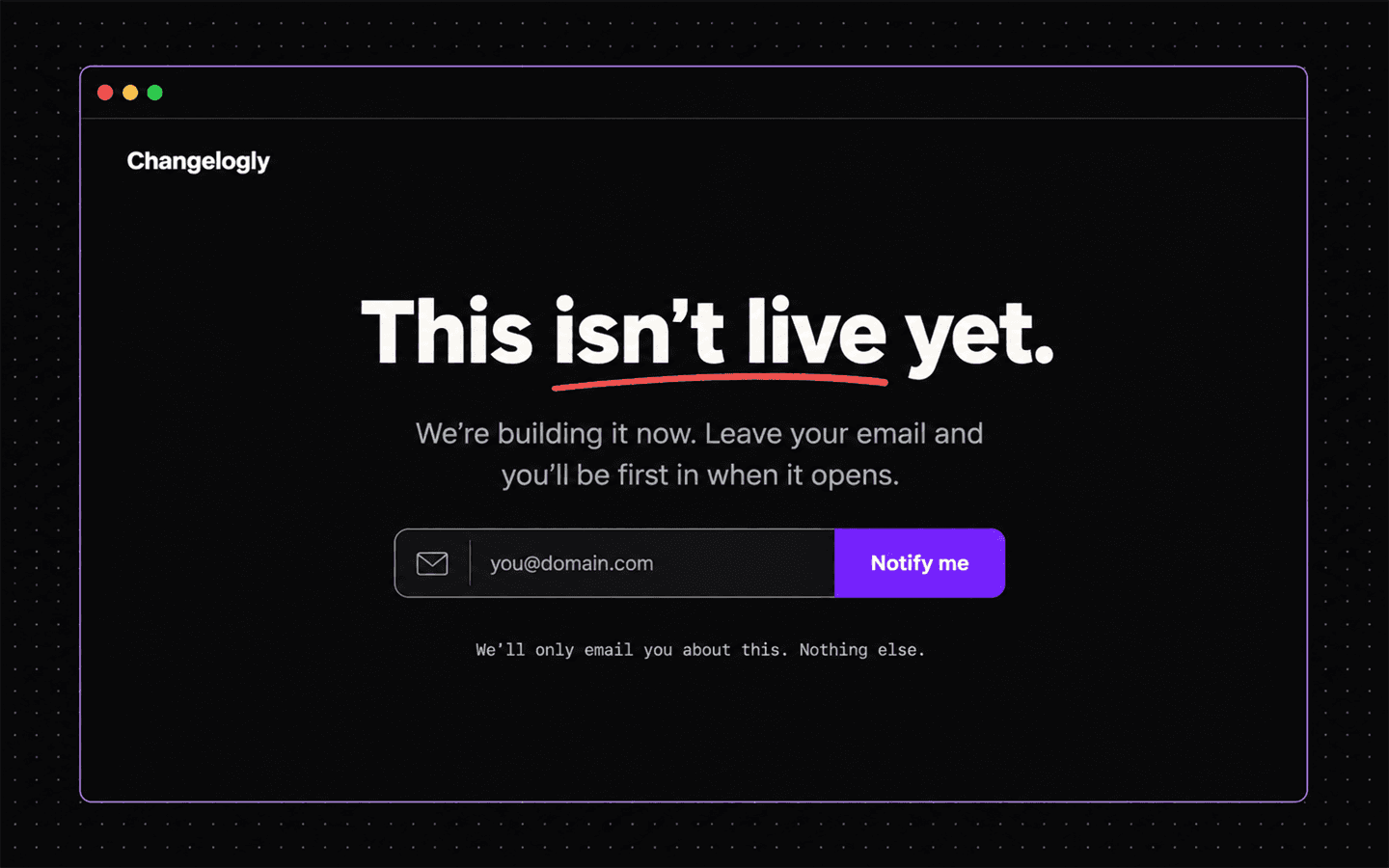
When someone clicks, they land on a short page that tells the truth: “This isn't live yet. We're building it now. Leave your email and you'll be first in when it opens.” A Tally or Typeform embed handles the email. Never fake the product past this point. No fake dashboard, no “processing your request.” The click is the data; the lie stops there.
5. Get the right traffic to it
This is the part nobody with an existing audience has to think about, and the part that decides whether your test means anything. You need a few hundred of the right people on the page. Roughly in order of signal quality: post in the communities where your target user already complains about the problem (a real post about the problem, with the page as a footnote, not a drive-by link); run a small $50 to $150 ad test on Reddit or Meta for a clean cold sample; post a Show HN or a “coming soon” Product Hunt page. If you don't know where your people gather, that's its own signal, and the validation checklist covers how to find out before you get this far.
What counts as a pass
There's no universal number, and any guide that hands you one is guessing. But you can reason your way to a threshold.
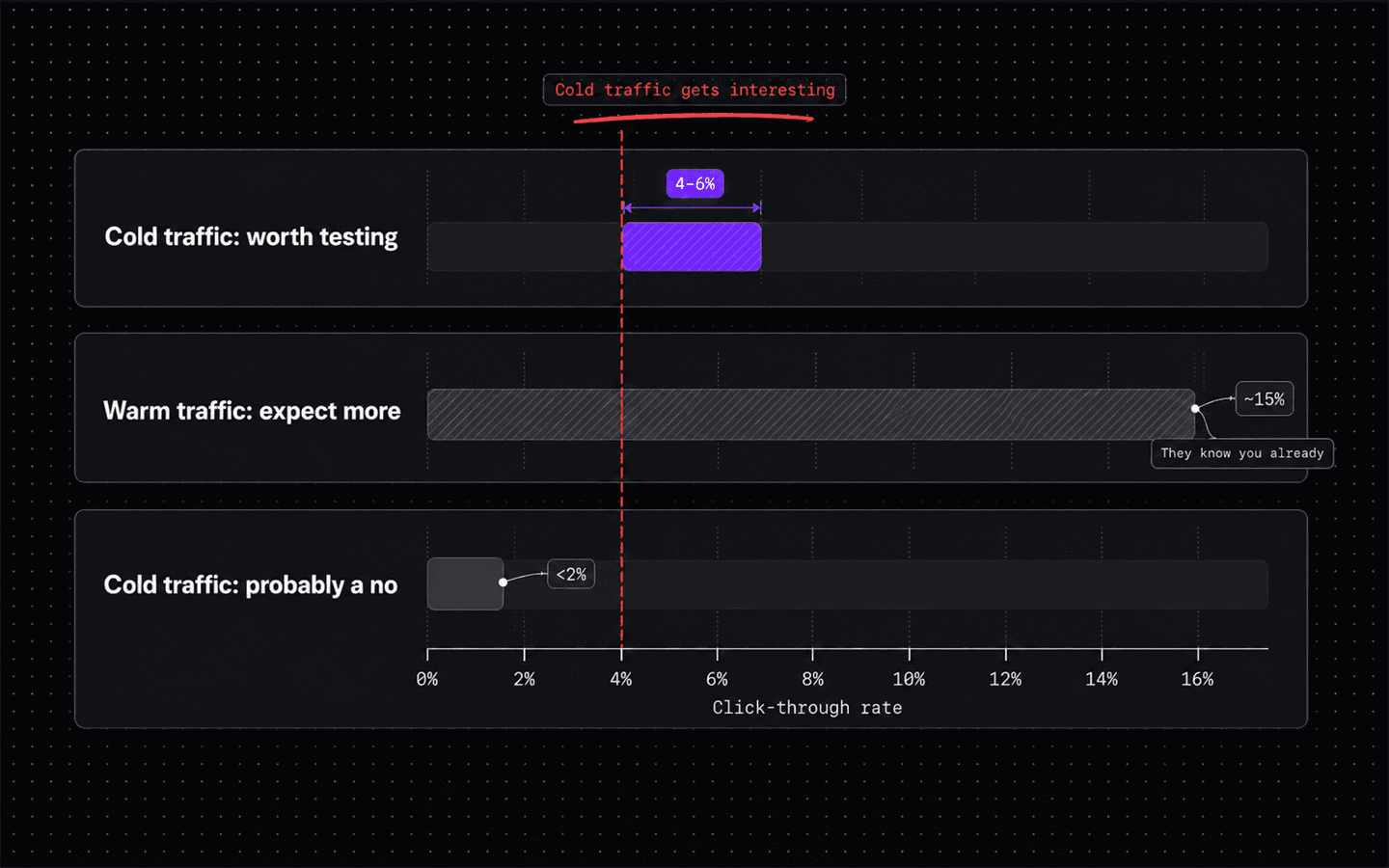
Cold traffic (ads, strangers). A click-through rate around 4 to 6% on a well-targeted ad or landing page is a real signal. These people have no relationship with you and no reason to be polite.
Warm traffic (your community post, your followers). Expect higher raw numbers and trust them less. People who know you click to be supportive. A 15% click rate from a friendly subreddit thread might be worth the same as 5% from cold ads. Weight it down in your head.
The email conversion is the stronger signal. A click costs nothing. Typing an email address costs a little. If a real share of the people who click also leave an email, that's the number I'd trust most.
Minimum sample. Don't read anything into fewer than about 100 clicks, or 300 to 500 visitors. Below that you're looking at noise. If you can't get 300 people to the page in two weeks across every channel you have, that's also a finding: distribution is going to be your hard problem, not the product. For SaaS especially, where the buyer is often a narrow role, validating the idea usually means solving distribution first.
What a clear no looks like. Under 1 to 2% click-through on cold traffic, or plenty of clicks with almost no emails. That doesn't always mean the idea is dead, but the demand isn't sitting there waiting for you.
Doing it without burning trust
A fake door test asks people to click something real and then tells them it isn't. Done carelessly that's a small betrayal, and repeated, it trains your audience to distrust your buttons.
Keep it clean. Show the fake door to a slice of your traffic, not everyone (if you have users, 5 to 10% of one segment is plenty). Time-box it to a week or two, then take it down, because a permanent fake door is just a lie with a URL. Never fake the outcome: “coming soon, want in?” is honest, “generating your report” followed by nothing is not. Close the loop, so everyone who left an email hears from you again, at launch or when you decide not to build it (“we tested this, not enough of you wanted it, here's what we're doing instead” is a fine email to send, and people respect it). And don't re-test the same people months apart.
The r/UXDesign and Hacker News threads on fake door testing are full of people who got burned by a company doing this badly. Read them before you run one. The technique earned its bad reputation, and it's avoidable.
The limit of a fake door test: a click isn't a customer
A fake door test measures whether your headline and framing are good enough to make someone click. That is all it measures. Real and useful, but narrower than most people treat it.
A click doesn't tell you the pain is real. People click out of curiosity or because the copy was sharp, not because they lie awake frustrated by the problem.
It doesn't tell you they'll pay. Intent to click and intent to enter a credit card are different by an order of magnitude.
And it doesn't tell you the market is open. You can get a great click-through rate on a problem that three funded companies already solve well. Your fake door doesn't know they exist.
So a fake door works best as one input, not the verdict. The behavioral signal is worth having. So is knowing whether people are actively complaining about this problem right now, in public, in their own words, and whether anyone already sells them a fix. Proven pulls that second layer from live posts on Reddit, Hacker News, and App Store reviews and scores it, with every quote linked back to the thread it came from. That's the roadmap Proven builds you: the fake door gives you the demand signal, the pain evidence tells you whether the demand is real. When both point the same way, you have something worth building.
Frequently asked questions
Is fake door testing ethical?
It can be, if you keep it honest and small. Show the fake door to a slice of your traffic rather than everyone, take it down after a week or two, never fake the outcome (a "coming soon" message is fine, a fake loading screen that leads nowhere is not), and email everyone who left an address to tell them what you decided. The technique gets a bad reputation when companies leave permanent fake features up or use them to harvest data with no follow-up.
How many clicks do I need for a fake door test?
Aim for at least 100 clicks, which usually means 300 to 500 visitors. Below that you're reading noise. If you can't get 300 of the right people to the page within two weeks using every channel you have, that itself is a signal that distribution will be your hard problem.
What's the difference between a fake door test and a painted door test?
They're mostly the same thing: an entry point for a feature that doesn't exist, used to measure demand. Some teams say "painted door" for tests inside an existing product and "fake door" for standalone landing pages, but the terms are used interchangeably and nothing important hangs on the distinction.
Can I run a fake door test with no audience?
Yes. Put up a one-page site with a real call to action, wire one click-tracking event, and drive a few hundred of the right people to it: community posts where your target user already discusses the problem, a small $50 to $150 ad test for a clean cold sample, or a Show HN. Cold traffic is a harder test than your own followers, which makes it more useful.
Does a click on a fake door mean people will pay?
No. A click tells you the headline and framing were good enough to create curiosity. Intent to click and intent to enter a credit card are very different. Treat the click as a demand signal, then check separately whether people are actively complaining about the problem and whether competitors already solve it. If you want the willingness-to-pay answer, put a real price on the reveal page, or run a concierge MVP where you deliver the service manually.
Written by Dairon Canel with AI assistance for research and structure.